Are you interested
- in applying your knowledge of gamma spectrometry practically,
- testing a professional gamma spectrometry program in practice,
- exploring the effects of different gamma detector types on the appearance of the measured spectra,
- recording and evaluating spectra from a variety of radioactive samples, some of which are not usually accessible,…
… then you should use the online measurement station by EducTUM.
This allows you to use various detector types for gamma spectrometry measurements (depending on the availability of the detectors at RCM). Initially, one NaI, one LaBr3, and one HPGe detector will be provided.
The measurement samples will be exchanged at irregular intervals (less frequently during the development phase) and will come from the nuclide inventory of RCM. They may include "traditional" gamma emitters, such as 60Co, 137Cs, 133Ba, but also more unconventional radionuclides or radionuclide mixtures like uranium, 241Am, waste mixtures from nuclear technology, etc.
The Measurement Station
A (typically) 24/7 available online measurement station is provided for conducting the measurements.
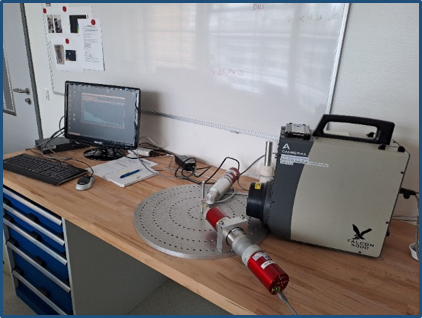
The following detectors can be used for measurements (depending on current availability):
- NaI: Scintillation detector with 2"x2" NaI(Tl) crystal and Osprey® photomultiplier (PMT) from Mirion (see https://www.mirion.com/de/products/technologies/spectroscopy-scientific-analysis/gamma-spectroscopy/detector-electronics/osprey-universal-digital-mca-tube-base-for-scintillation-spectrometry)
- LaBr3: Scintillation detector with 1.5"x1.5" LaBr3 crystal and Osprey® photomultiplier (PMT) from Mirion (see https://www.mirion.com/de/products/technologies/spectroscopy-scientific-analysis/gamma-spectroscopy/detector-electronics/osprey-universal-digital-mca-tube-base-for-scintillation-spectrometry)
- Falcon: Mobile, electrically-cooled Broad Energy Ge (BEGe) detector from Mirion (no longer available)
- Detective X: Ultra High Resolution HPGe from Ortec (see Detective X)
To access the measurement station and the corresponding programs, you need personally assigned access credentials (application see Terms of Use).
Terms of Use
- To use the online measurement station of EducTUM, a personally assigned username and password are required.
- You can request the username and password via email at
This email address is being protected from spambots. You need JavaScript enabled to view it. with the subject "EducTUM-online".
We will try to process your request as soon as possible, set up the access rights on the server, and email you the access credentials. Please understand that this may take a few days due to (personnel) capacity reasons. We would also appreciate a brief accompanying text in which you tell us your reasons for using the online tools. We may use this to supplement or expand our offerings.
- Usernames and access passwords are personally assigned to you and must not be shared. If another person is interested in using the program and/or conducting measurements, we are happy to provide them with their own access account upon registration (see above).
- All data obtained during the use of the online tools will be stored in a user-specific directory and are accessible to the EducTUM team. Various provided programs log activities in log files accessible to the user and the EducTUM team.
- In case of prolonged inactivity of a user account or sharing of access credentials with others, we reserve the right to delete the access credentials and the user-specific directory.
RCM assumes no liability or warranty for the use and availability of the provided tools. Use for commercial purposes is prohibited without our written consent.
After so much formalities, now to practical usage:
Logging in and conducting gamma spectrometry measurements
- Open the login page to access the online tools either in EducTUM in the section Programs or directly in your browser by visiting prgr.eductum.de.
- Log in with your personally assigned user data (see Terms of Use).
Information:
Currently, the program LVis is available for gamma spectrometry measurements (only).
- Under currently available applications click on the icon LVis.
- A connection to the RCM server will be established, and the LVis program will open (if you are using LVis for the first time, it will appear with mostly empty windows)
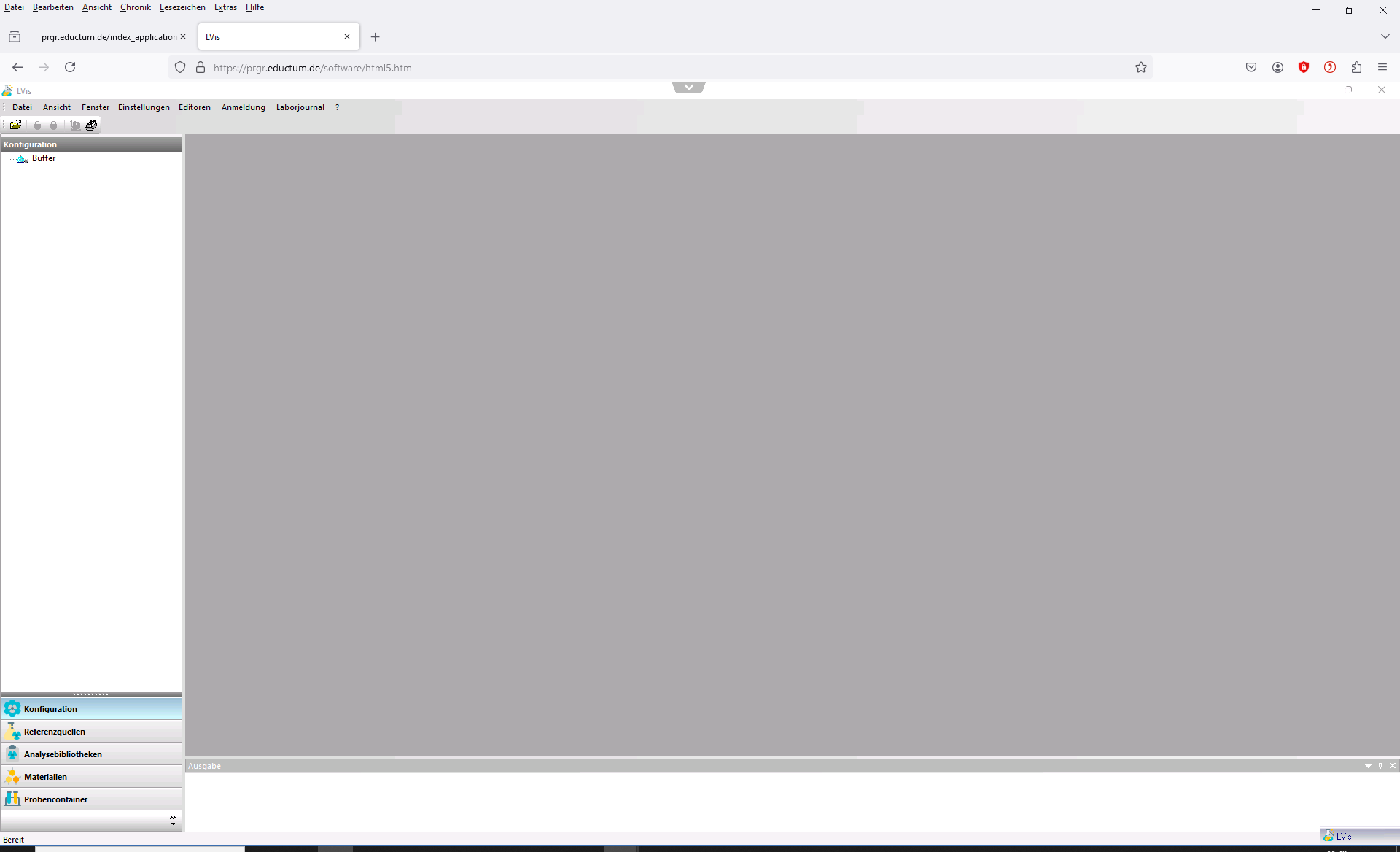
and is now ready for
- the selection and configuration of a detector for conducting an online measurement,
- the calibration of the detector with provided calibration spectra (energy, efficiency),
- the measurements on the current sample,
- the evaluation of the stored or measured data,
- and much more.
Some useful hints
- Information on operating LVis can be found in short tutorials.
- A step-by-step guide on conducting and evaluating a gamma measurement with LVis can be found in the instructions for Gamma Spectrometry Practicum starting from the section on conducting the measurement.
Interrupting LVis
You can interrupt your work with LVis at any time. Your results created so far will be saved in a personally assigned folder.
To exit LVis, use File/Exit. If results have not been saved yet, you will be asked where you want to save them. Confirm the suggested directories and filenames.
Exiting LVis
When you finish your work with LVis, close the program via File/Exit. This ensures that your current work is saved and available the next time you open it.
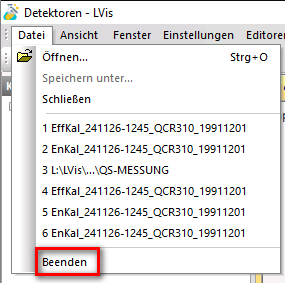
Exiting the program page
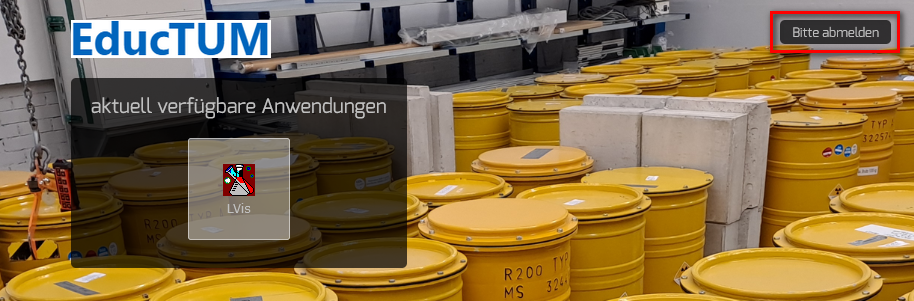
After exiting LVis - and if no other program is to be used - you must also log out from the page with the available programs. To do this, press the button Please log out.
And now, good luck and enjoy conducting gamma spectrometry measurements.
